We’re evolving Price Indicator so you can tell the full value story of your cars.
You asked for greater influence over how your stock is perceived, and we’ve listened. Over the last few months, our teams have been hard at work evolving Price Indicator into a tool that lets you showcase the full value of each vehicle on your forecourt. We will begin the roll out of these changes on Autotrader from the 29th of September.
In this article, we’ll explore:
Why we’ve made these changes
What’s changing
How it will impact you
Build on your feedback
Through continuous feedback directly from retailers, including our newly formed Customer Advisory Group, we’re making changes to Price Indicator. We’ve taken this feedback onboard and completed months of testing with both buyers and retailers to ensure these updates benefit everyone.
So, what’s changing?
We’re introducing new features to evolve Price Indicator to provide buyers with more context around the price of a vehicle so they can have a better understanding of its price point and any additional value your dealership offers.
A new and improved design
We’re moving away from the dial symbol and replacing it with a new label and pricing panel. This provides better context around each price point, showing your price relative to the market and helping buyers understand what the labels represent.
New ‘Key selling points’
You can now list the top 3 things that make your vehicle special - such as a full service history, rare specification options or a new set of tyres.
New ‘Price commentary’
This is a new content area that will appear on the product page under “Seller’s comments' directly alongside the Price Indicator label. Here you can highlight the additional value drivers included in the price, like OEM approved benefits, extended warranties or exceptional preparation standards. Having this additional information displayed right beside the Price Indicator label will make it easier for buyers to better understand the price point of your vehicle.
This content can be templated at a dealership or brand-level, so you can apply it to your adverts instantly.
You will also have access to this feature before the 29th, so you can setup your templates before these new changes will be visible for buyers on Autotrader. Please take the time over the next few weeks to get your templates ready so you are in the best position to highlight the value you offer to your customers.
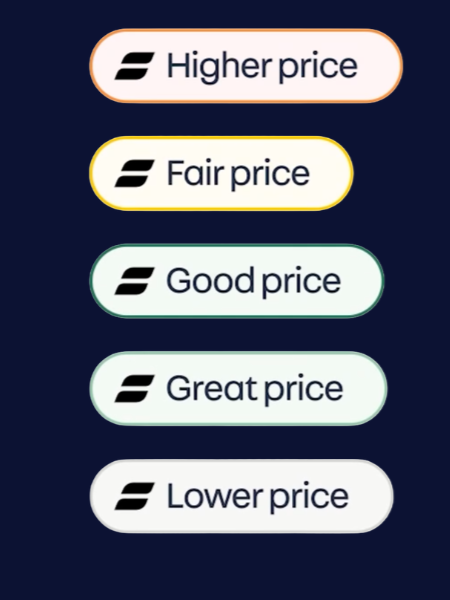
We’ve implemented these changes based directly off the feedback we’ve received
We want you to be able to give additional context to your pricing, allowing you to spend less time discussing the price and more time discussing the merits of the actual car.
By pairing trusted Price Indicators with these new content areas, you benefit from
Trust built upfront: Transparently showing the why behind your price builds immediate credibility that reassures buyers they are looking at a fair deal, before they even reach out.
More informed buyers: Buyers arrive with a better understanding of both the market position and the extra spec or value included in your price.
More balanced conversations: Giving clear, upfront context helps remove ambiguity, shifting the conversation from a price negotiation to the overall value you provide.
How will these changes impact you?
These updates to Price Indicator mean that there will be changes in your Portal. These new updates are easy to navigate, as displayed in the demo below.
-
We’re refreshing the navigation of the Portal accounts menu
There will be a new option available within the ‘Account’ navigation called ‘Price commentary’
This will take you to a new area where you can view, create, edit or delete templates.
-
Click create a new template
Enter your price commentary text
Select optional Brand (make) and OEM approved settings
If no Brand or OEM approved settings are selected it will apply to all cars
You can see our tips for writing the most effective pricing comments here
-
When editing a stock item, you will now be able to see new fields on the ‘Advertising’ tab
Here you can manually input vehicle specific price commentary rather than using the applicable template
-
Enter your price commentary text and select optional Brand (Make) and OEM approved status settings
Now select which sites within your group you want to apply this template to
You will also be able to search for sites and add additional sites
-
There will be 3 new fields available on the ‘Advertising’ tab when editing a stock item under Key selling points
These new fields will sit directly between the attention grabber and vehicle description
Head over to portal now to get your templates ready so you are in the best position to highlight the value you offer to your customers
FAQs
-
The updates to Price Indicator will start being rolled out from the 29th of September
-
These updates have been shaped by retailer and consumer feedback. The aim is to give you more influence over how your vehicles are perceived by buyers, helping you explain the full value behind each price rather than relying on the Price Indicator alone.
-
Buyers will see a refreshed Price Indicator design, with a new label and pricing panel that gives clearer context around where a vehicle sits in the market.
They’ll also be able to see additional information through Key selling points and Price commentary.
-
Key selling points are three bullet points where you can highlight what makes a specific vehicle stand out, such as full-service history, rare specification options, low mileage or recent preparation work.
-
This is a new content area next to the price indicator label that gives you space to explain the additional value your business offers beyond the vehicle itself, such as warranties, preparation standards or aftersales support.
-
Yes.
You can create Price commentary templates at dealership or brand level, helping you apply consistent messaging across relevant adverts without manually entering the same information each time.
-
Yes.
When editing a stock item in Portal, you’ll be able to manually enter vehicle-specific Price commentary if you want to tailor the message beyond the standard template.
-
For Price commentary, no – not if you set up a template.
Templates are designed to reduce manual input, especially where the same Price commentary applies across multiple vehicles, brands, or sites.
For Key selling points, these will need to be added to each vehicle advert individually.
-
You can only setup templates in Portal. Templates cannot be managed in third-party systems, but you can input 'Price commentary' for individual vehicles if this feature is supported in your third-party system
-
By giving buyers clearer pricing context upfront, these changes can help build trust earlier and make enquiries more informed.
That means conversations can focus more on the vehicle, its value and what your business offers, rather than price alone.